Understanding Motif Review Credits
Last updated: September 8, 2026
Your Motif Review plan includes AI credits — a usage allowance for our AI-powered features. This article explains how credits work, what uses them, and how to keep track of your usage.
What are credits?
Credits are your organization's allowance for using AI-powered features. They are pooled across your entire organization, so all users on your account draw from a shared balance.
💡 Because credits are shared, lighter users naturally offset heavier ones — your team gets flexibility without per-person limits.
What uses credits?
Four AI features consume credits:
Feature | What it does | Fast (Draft speed) | Pro (Highest quality) |
|---|---|---|---|
Image Generation | Visualize your designs with AI — no rendering experience required. Create photorealistic, watercolor, sketch, marker, and other styles from 3D models, saved views, sketches, or any image, with simple modifiers for environment, weather, and time of day. | 1 credit | 2 credits |
Image Editing | Refine your AI-generated images. Edit with a text prompt to change materials or colors across the whole image, use the lasso tool for targeted changes to a region, or apply textures and styles with reference images. | 1 credit | 2 credits |
4K Upscale | Sharpen and enlarge your favorite renders to 4K. Work at lower resolutions while you explore, then upscale only the images you want to keep for presentations or deliverables. | 1 credit | 2 credits |
Video Generation | Turn a single image into a short video sequence. Works with or without a prompt — use it on rendered views to bring your visualizations to life with camera movement and animation. | 15 credits | 30 credits |
Model tiers: Fast and Pro
For each feature above, you can choose between two model tiers:
Fast models — quicker results with lighter credit usage. Great for rapid exploration and early iterations. (Nano Banana, Nano Banana 2, Gen-4 Turbo, Veo 3.1 Fast)
Pro models — higher quality output at higher credit cost of Fast models. Best for final renders and client-facing deliverables. (Nano Banana Pro, Veo 3.1)
Within a tier, all actions cost the same — a single image render and an edit using five reference images cost the same number of credits on Nano Banana. The only things that change the cost are the model tier you choose and whether you're generating an image or a video.
💡 Mix and match tiers based on the task: use Fast while you explore, and save Pro for the work that counts.
⚠ Video generation costs more than image generation, regardless of tier.
How many credits do I get?
Plan | Credits included | Billing cycle |
|---|---|---|
Pro ($25/user/month) | 60 credits per user per month, pooled across your org | Monthly — credits refresh each cycle |
Enterprise | Custom | Annual — credits refresh each year |
⚠ Credits do not roll over. Unused credits expire at the end of each billing cycle — monthly for Pro, annually for Enterprise. If you add seats mid-cycle, the pro-rated credit amount for those seats is added to your pool right away.
How can I see my usage?
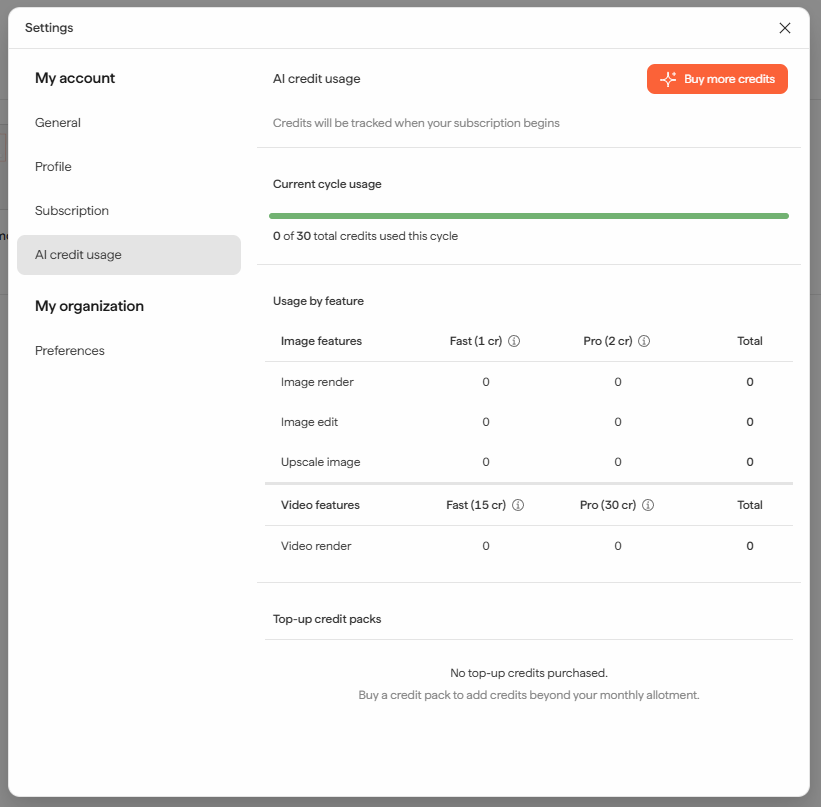
Org admins will have a dedicated AI credit usage page in Settings that brings everything credit-related into one place. Admins will be able to buy more credits as needed.
What happens when I run out of credits?
When your credits are exhausted, AI features pause until your next billing cycle or until you purchase a top-up credit pack. Admins can buy additional credits directly in the app to restore access immediately. For enterprise accounts, talk to your CSM for credit pack purchases.
What happens to failed generations?
Credits are refunded for failed generations.
Need help? Reach out to us at community.motif.io