Troubleshooting login and other browser related issues
Last updated: September 22, 2026
Step 1: Try Empty Cache and Hard Reload
Before clearing site data, first attempt an Empty Cache and Hard Reload, as this is faster and often sufficient.
Open Chrome DevTools (Ctrl/Cmd + Shift + I)
Right-click the browser Reload button.
Select Empty Cache and Hard Reload.
Note: This clears cached files only and does not remove cookies or site storage.
Step 2: Clear Site Data
If the issue persists, clear all stored data for the site.
Navigate to the affected site.
Click the settings icon (or lock icon) in the address bar.
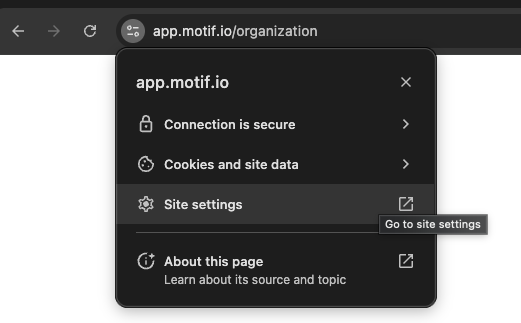
Select Site settings.
Click Delete data to clear data for this site.
Refresh the page. This clears:
Cookies
Local and session storage
IndexedDB
Service workers
Cache (site-specific)
Need help? Reach out to us at community.motif.io