Dynamo for Motif
Last updated: April 28, 2026
The Motif Dynamo package lets you create and manage Motif projects, boards, and assets from a Dynamo script — useful for automating repetitive setup tasks or publishing geometry programmatically.
⚠ Compatibility: Requires Revit 2025 or later, or DynamoSandbox 3.0.3 or later.
Install the Motif Dynamo package
Open Dynamo from within Revit (Manage tab) or launch DynamoSandbox.
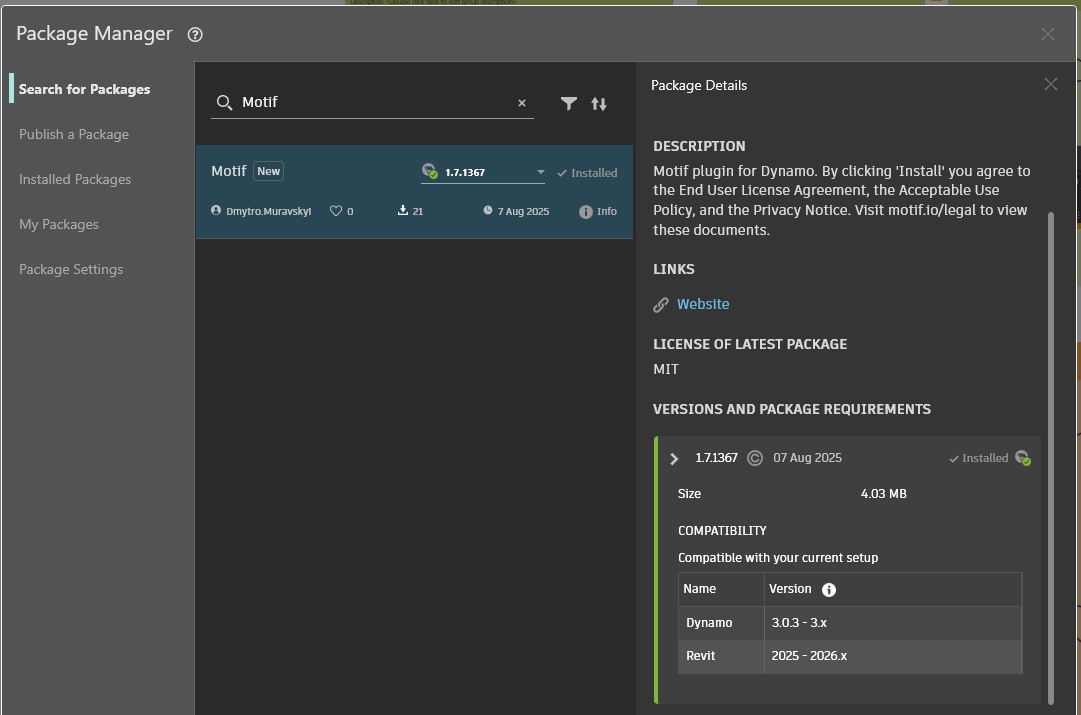
Go to Packages → Package Manager.
Search for Motif and click Install.
Dynamo will notify you the package contains binaries — this is expected.
Restart the same Dynamo version used to install. Motif tools will appear in the node library.
💡 Sample workflow files are available to download: [DynamoSamples.zip]
Sign in to Motif from Dynamo
If prompted to log in, right-click the node and select Login from the context menu.
What you can do with the Motif Dynamo tools
Create and manage
Add users to a project
Create projects and boards
Create file assets from local files (JPG, PNG, PDF, SVG, OBJ, GLB)
Create geometry assets from Dynamo geometry
Place asset instances on a board
Read data
Get all organizations, projects, and boards for the active account
Get members of an organization
Get assets in a project
Get board contents (text, comments, assets, asset instances, frames)
Get comments on an asset or board
Advanced
Use Python or C# nodes to filter lists or interact with Motif object properties.
Use a Code Block node to access properties on returned Motif objects.
💡 Use Dynamo's Manual run mode, or freeze creation nodes, to avoid creating duplicate objects while building your script.
Need help? Reach out to us at community.motif.io